As AI inference grows into a significant share of cloud spend, understanding who and what are driving costs is essential for chargebacks, cost optimization, and financial planning. Today, we’re announcing granular cost attribution for Amazon Bedrock inference.
Amazon Bedrock now automatically attributes inference costs to the IAM principal that made the call. An IAM principal can be an IAM user, a role assumed by an application, or a federated identity from a provider like Okta or Entra ID. Attribution flows to your AWS Billing and works across models, with no resources to manage and no changes to your existing workflows. With optional cost allocation tags, you can aggregate costs by team, project, or custom dimension in AWS Cost Explorer and AWS Cost and Usage Reports (CUR 2.0).
In this post, we share how Amazon Bedrock’s granular cost attribution works and walk through example cost tracking scenarios.
How granular cost attribution works
In your CUR 2.0, you can see which AWS Identity and Access Management (IAM) principals are calling Amazon Bedrock and what each is spending when you enable IAM principal data in your data export configuration, as shown in the following example:
| line_item_iam_principal | line_item_usage_type | line_item_unblended_cost |
| arn:aws:iam::123456789012:user/alice | USE1-Claude4.6Sonnet-input-tokens | $0.069 |
| arn:aws:iam::123456789012:user/alice | USE1-Claude4.6Sonnet-output-tokens | $0.214 |
| arn:aws:iam::123456789012:user/bob | USE1-Claude4.6Opus-input-tokens | $0.198 |
| arn:aws:iam::123456789012:user/bob | USE1-Claude4.6Opus-output-tokens | $0.990 |
Here, you can see that Alice is using Claude 4.6 Sonnet and Bob is using Claude 4.6 Opus, and what each is spending in input and output tokens. The following table shows what the line_item_iam_principal column contains for each identity type:
| How you call Amazon Bedrock Inference | line_item_iam_principal |
| AWS IAM User | …user/alice |
| Bedrock key (maps to IAM User) | …user/BedrockAPIKey-234s |
| AWS IAM Role (e.g. AWS Lambda function) | …assumed-role/AppRole/session |
| Federated User (e.g. from an identity provider) | …assumed-role/Role/user@acme.org |
Adding tags for aggregation and Cost Explorer
To aggregate costs by team, project, or cost center, add tags to your IAM principals. Tags flow to your billing data in two ways:
- Principal tags are attached directly to IAM users or roles. Set them once and they apply to every request from that principal.
- Session tags are passed dynamically when a user or application assumes an IAM role to obtain temporary credentials or embedded in identity provider assertions. To learn more, see Passing session tags in AWS STS.
After activation as cost allocation tags in AWS Billing, both tag types appear in the tags column of CUR 2.0 with the iamPrincipal/ prefix, as shown in the following example:
| How you call Bedrock | line_item_iam_principal | tags |
| AWS IAM User | …user/alice | {“iamPrincipal/team”:”ds”} |
| AWS IAM Role | …assumed-role/AppRole/session | {“iamPrincipal/project”:”chatbot”} |
| Federated User | …assumed-role/Role/user@acme.org | {“iamPrincipal/team”:”eng”} |
For more guidance on building a cost allocation strategy, see Best Practices for Tagging AWS Resources.
Quickstart by scenario
Your setup depends on how your users and applications call Amazon Bedrock. The following table summarizes the attribution available in CUR 2.0 for each access pattern and what to configure for tag-based aggregation:
| Your setup | CUR 2.0 attribution | How to add tags for aggregation + Cost Explorer | Scenario |
| Developers with IAM users or API keys | Each user’s ARN appears in CUR 2.0 | Attach tags to IAM users | 1 |
| Applications with IAM roles | Each role’s ARN appears in CUR 2.0 | Attach tags to IAM roles | 2 |
| Users authenticate through an IdP | session name in ARN identifies users | Pass session name and tags from your IdP | 3 |
| LLM gateway proxying to Bedrock | Only shows gateway’s role (one identity for all users) | Add per-user AssumeRole with session name and tags | 4 |
Note: For Scenarios 1–3, the line_item_iam_principal column in CUR 2.0 gives you per-caller identity attribution. Tags are only needed if you want to aggregate by custom dimensions (team, cost center, tenant) or use Cost Explorer for visual analysis and alerts. For Scenario 4, per-user session management is required to get user-level attribution. Without it, traffic is attributed to the gateway’s single role.
After adding tags, activate your cost allocation tags in the AWS Billing console or via UpdateCostAllocationTagsStatus API. Tags appear in Cost Explorer and CUR 2.0 within 24–48 hours.
The following sections walk through a few common scenarios.
Scenario 1: Per-user tracking with IAM users and API keys
Use case: Small teams, development environments, or rapid prototyping where individual developers use IAM user credentials or Amazon Bedrock API keys.
How it works:
Each team member has a dedicated IAM user with long-term credentials. When either user-1 or user-2, for example, calls Amazon Bedrock, Amazon Bedrock automatically captures their IAM user Amazon Resource Name (ARN) during authentication. Your CUR 2.0 shows who is spending what.
If you want to roll up costs by team, cost center, or another dimension — for example, to see total spend across data science team members — attach tags to your IAM users. You can add tags in the IAM console, AWS Command Line Interface (AWS CLI), or the AWS API. The following example uses the AWS CLI:
# Tag the data science team's users
aws iam tag-user \
  --user-name user-1 \
  --tags Key=team,Value="BedrockDataScience" Key=cost-center,Value="12345"

aws iam tag-user \
  --user-name user-2 \
  --tags Key=team,Value="BedrockDataScience" Key=cost-center,Value="12345"
What appears in CUR 2.0:
The Cost and Usage Report captures both the individual user identity and their tags, giving you two dimensions for analysis as shown in the following example:
| line_item_iam_principal | line_item_usage_type | line_item_unblended_cost | tags |
| arn:aws:iam::123456789012:user/user-1 | USE1-Claude4.6Sonnet-input-tokens | $0.0693 | {“iamPrincipal/team”:”BedrockDataScience”,”iamPrincipal/cost-center”:”12345″} |
| arn:aws:iam::123456789012:user/user-1 | USE1-Claude4.6Sonnet-output-tokens | $0.2145 | {“iamPrincipal/team”:”BedrockDataScience”,”iamPrincipal/cost-center”:”12345″} |
| arn:aws:iam::123456789012:user/user-2 | USE1-Claude4.6Opus-input-tokens | $0.1980 | {“iamPrincipal/team”:”BedrockDataScience”,”iamPrincipal/cost-center”:”12345″} |
| arn:aws:iam::123456789012:user/user-2 | USE1-Claude4.6Opus-output-tokens | $0.9900 | {“iamPrincipal/team”:”BedrockDataScience”,”iamPrincipal/cost-center”:”12345″} |
The line_item_usage_type column encodes the region, model, and token direction (input vs. output), so you can answer questions like “How much did user-1 spend on Sonnet input tokens vs. output tokens?” or “Who’s using Opus vs. Sonnet?”
From this data, you can analyze costs in several ways:
- By user: Filter on
line_item_iam_principalto see exactly how much each person spent. This is useful for identifying heavy users or tracking individual experimentation costs. - By model: Filter on
line_item_usage_typeto compare per-model spend, for example, who’s driving Opus costs vs. Sonnet. - By team: Group by
iamPrincipal/teamto see total spend across data science team members. This is useful for departmental chargeback.
This approach is ideal when you have a manageable number of users and want the simplest possible setup. Each user’s credentials directly identify them in billing, and tags let you roll up costs to higher-level dimensions.
Using Amazon Bedrock API keys: Amazon Bedrock also supports API keys for a simplified authentication experience similar to other AI providers. API keys are associated with IAM principals. Requests made with API keys are attributed to the corresponding IAM identities, so the same line_item_iam_principal and tag-based attribution applies. This means organizations distributing API keys to developers or embedding them in applications can still track costs back to the originating IAM user or role.
Scenario 2: Per-application tracking with IAM roles
Use case: Production workloads where applications (not humans) call Amazon Bedrock, and you want to track costs by project or service.
How it works:
You have two backend applications, for example, a document processing service (app-1) and a chat service (app-2). Each application runs on compute infrastructure (Amazon EC2, AWS Lambda, Amazon Elastic Container Service (Amazon ECS), etc.) and assumes a dedicated IAM role to call Amazon Bedrock. When either application calls Amazon Bedrock, the assumed-role ARN is automatically captured. This attribution flows to your CUR 2.0 report, giving you per-application cost visibility.
You can filter by line_item_iam_principal, which contains the role name, to see total spend per application, or by line_item_usage_type to compare model usage across services. Tags are optional. If your application generates unique session names per request or batch job, you can track costs at an even finer level of detail.
If you want to roll up costs by project, cost center, or another dimension — for example, to compare total spend across DocFlow vs. ChatBackend — attach tags to the IAM roles:
# Tag the document processing role
aws iam tag-role \
  --role-name Role-1 \
  --tags Key=project,Value="DocFlow" Key=cost-center,Value="12345"

# Tag the chat service role
aws iam tag-role \
  --role-name Role-2 \
  --tags Key=project,Value="ChatBackend" Key=cost-center,Value="12345"
When app-1 assumes Role-1 and calls Amazon Bedrock, the request is attributed to the assumed-role session. The role’s tags flow through to billing automatically.
What appears in CUR 2.0:
The line_item_iam_principal shows the full assumed-role ARN including the session name, as shown in the following example:
| line_item_iam_principal | line_item_usage_type | line_item_unblended_cost | tags |
| arn:aws:sts::123456789012:assumed-role/Role-1/session-123 | USE1-Claude4.6Sonnet-input-tokens | $0.0330 | {“iamPrincipal/project”:”DocFlow”,”iamPrincipal/cost-center”:”12345″} |
| arn:aws:sts::123456789012:assumed-role/Role-1/session-123 | USE1-Claude4.6Opus-output-tokens | $0.1650 | {“iamPrincipal/project”:”DocFlow”,”iamPrincipal/cost-center”:”12345″} |
| arn:aws:sts::123456789012:assumed-role/Role-2/session-456 | USE1-NovaLite-input-tokens | $0.0810 | {{“iamPrincipal/project”:”ChatBackend”,”iamPrincipal/cost-center”:”12345″} |
| arn:aws:sts::123456789012:assumed-role/Role-2/session-456 | USE1-NovaLite-output-tokens | $0.0500 | {“iamPrincipal/project”:”ChatBackend”,”iamPrincipal/cost-center”:”12345″} |
This gives you multiple analysis options:
- Filter by role: See total spend per application using the role name portion of the ARN.
- Filter by session: Track costs per request or batch job using the session name.
- Aggregate by project: Group by
iamPrincipal/projectto compare costs across DocFlow vs. ChatBackend. - Aggregate by cost center: Group by
iamPrincipal/cost-centerto see total spend across applications owned by the same team.
This approach is ideal for microservices architectures where each service has its own IAM role, a security best practice that now doubles as a cost attribution mechanism.
Scenario 3: Per-user tracking with federated authentication
Use case: Enterprise environments where users authenticate through a corporate identity provider (Auth0, Okta, Azure AD, Amazon Cognito) and access AWS via OpenID Connect (OIDC) or Security Assertion Markup Language (SAML) federation.
How it works:
Users authenticate through your identity provider (IdP) and assume a shared IAM role. Per-user attribution comes from two mechanisms: the session name (user identity embedded in the assumed-role ARN) and session tags (team, cost center, etc. passed from the IdP). One IAM role serves the users, so there are no per-user IAM resources to manage.
The session name (highlighted in green) is what appears in line_item_iam_principal:
arn:aws:sts::123456789012:assumed-role/BedrockRole/user-1@acme.org
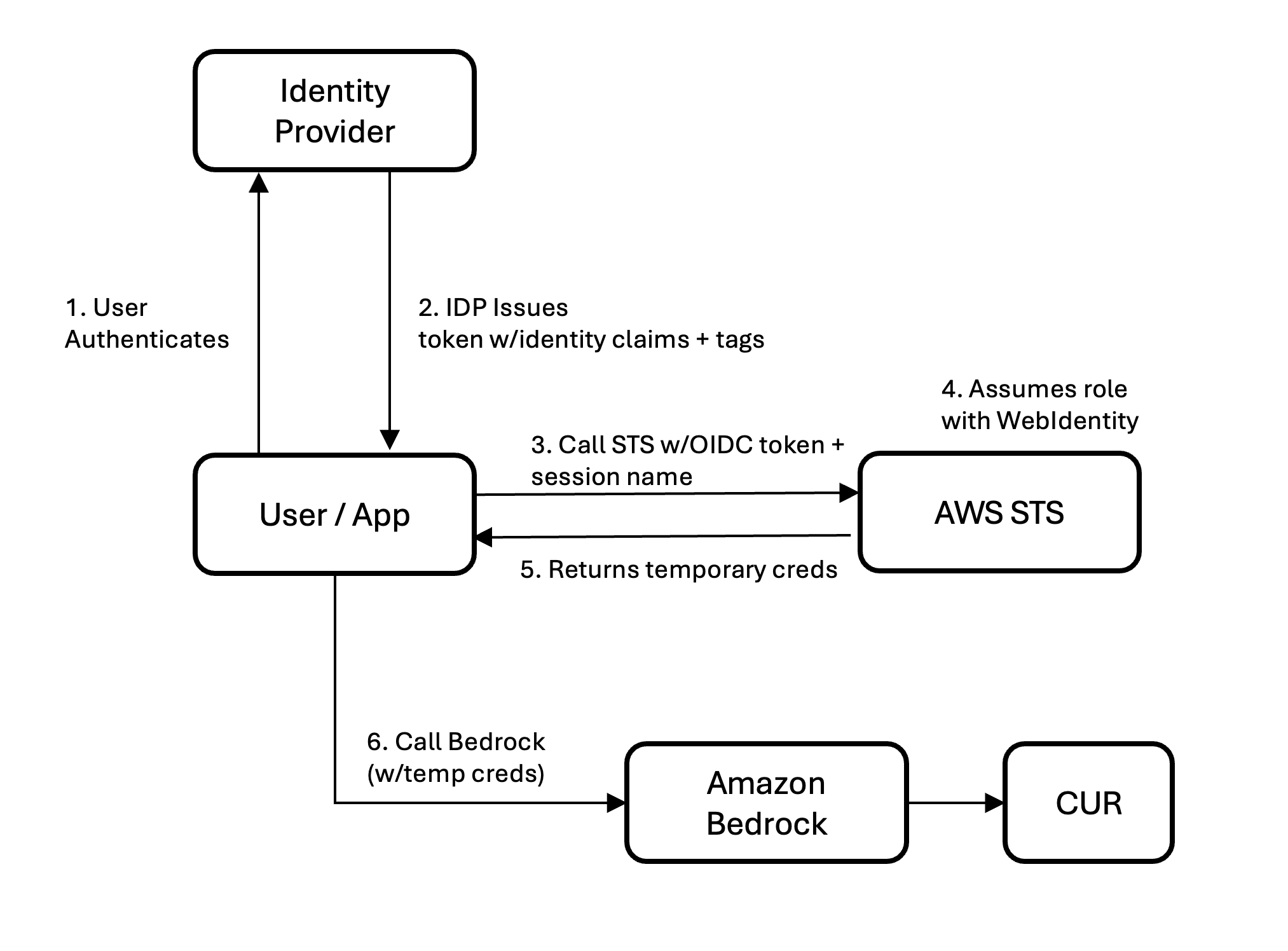
Figure 1. Identity flow in federated authentication scenarios
For OIDC federation (Auth0, Cognito, Okta OIDC): Register your IdP as an IAM OIDC provider, create a role with a trust policy allowing sts:AssumeRoleWithWebIdentity and sts:TagSession, and configure your IdP to inject the https://aws.amazon.com/tags claim into the ID token. AWS Security Token Service (AWS STS) automatically extracts session tags from this claim. The calling application sets –role-session-name to the user’s email (or another identifier) when calling AssumeRoleWithWebIdentity.
For SAML federation (Okta, Azure AD, Ping, ADFS): Configure SAML attribute mappings in your IdP to pass RoleSessionName (e.g., user email) and PrincipalTag:* attributes (team, cost center) in the assertion. Both session name and tags are embedded in the signed assertion — the calling application doesn’t set them separately. The IAM role needs sts:AssumeRoleWithSAML and sts:TagSession.
In both cases, tags are cryptographically signed inside the assertion or token so users cannot tamper with their own cost attribution.
What appears in CUR 2.0:
| line_item_iam_principal | line_item_usage_type | line_item_unblended_cost | tags |
| …assumed-role/Role-1/user-1@acme.org | USE1-Claude4.6Opus-input-tokens | $0.283 | {“iamPrincipal/team”:”data-science”,”iamPrincipal/cost-center”:”12345″} |
| …assumed-role/Role-1/user-1@acme.org | USE1-Claude4.6Opus-output-tokens | $0.990 | {“iamPrincipal/team”:”data-science”,”iamPrincipal/cost-center”:”12345″} |
| …assumed-role/Role-1/user-2@acme.org | USE1-Claude4.6Sonnet-input-tokens | $0.165 | {“iamPrincipal/team”:”engineering”,”iamPrincipal/cost-center”:”67890″} |
| …assumed-role/Role-1/user-2@acme.org | USE1-Claude4.6Sonnet-output-tokens | $0.264 | {“iamPrincipal/team”:”engineering”,”iamPrincipal/cost-center”:”67890″} |
In this example, user-1 is using Opus and user-2 is using Sonnet. Both share the same IAM role, but each is individually visible. Group by iamPrincipal/team for departmental chargeback or parse the session name for per-user analysis.
Scenario 4: Per-user tracking through an LLM gateway
Use case: Organizations running a large language model (LLM) gateway or proxy (LiteLLM, custom API gateway, Kong, Envoy, or a homegrown service) that sits between users and Amazon Bedrock.
The problem: Gateways authenticate users at their own layer, then call Amazon Bedrock using a single IAM role attached to the gateway’s compute. Without additional work, every Amazon Bedrock call appears in CUR 2.0 as one identity with no per-user or per-tenant visibility.
The solution: Per-user session management
The gateway calls AssumeRole on an Amazon Bedrock-scoped role for each user, passing the user’s identity as --role-session-name and their attributes (team, tenant, cost center) as --tags. The resulting per-user credentials are cached (valid up to 1 hour) and reused for subsequent requests from the same user. This requires two IAM roles. The first is a gateway execution role with sts:AssumeRole and sts:TagSession permissions. The second is an Amazon Bedrock invocation role, trusted by the gateway role and scoped to Amazon Bedrock APIs.
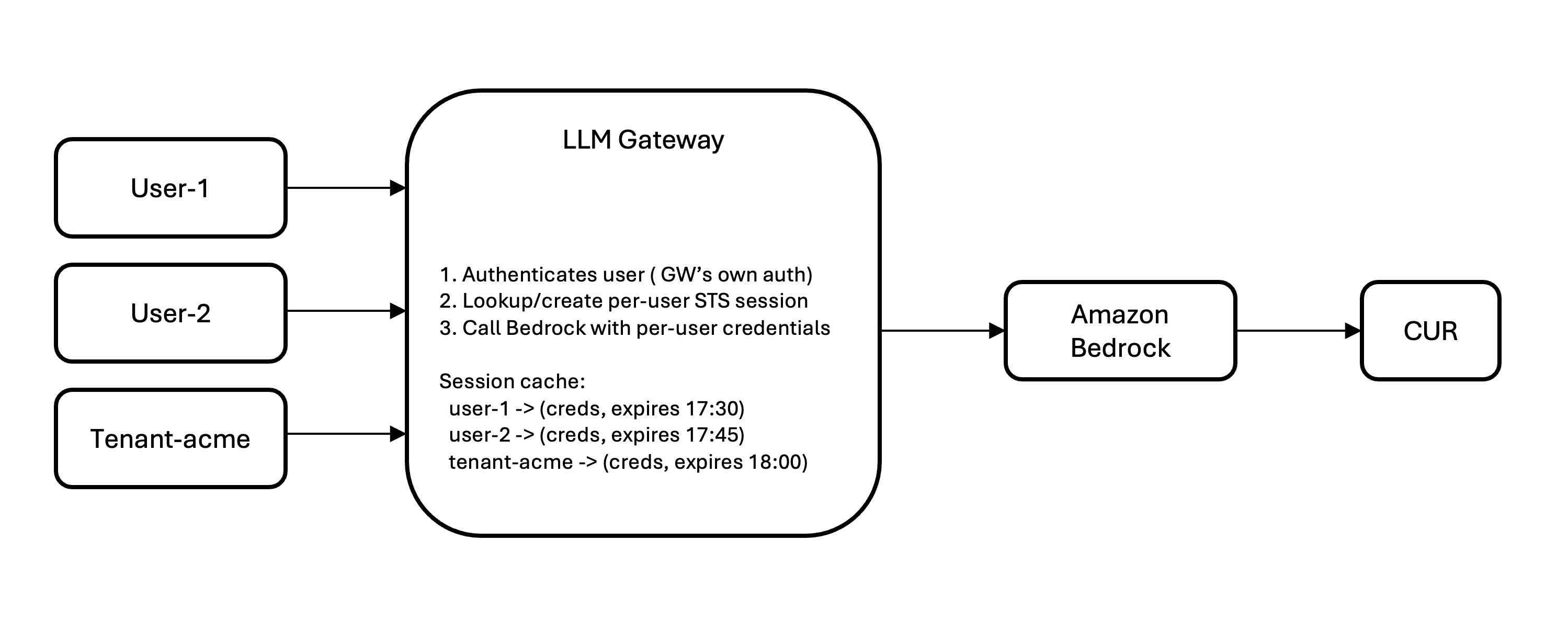
Figure 2. Identity flow in LLM Gateway scenarios
Key implementation considerations:
- Cache sessions:
AssumeRoleadds minimal latency. With a 1-hour time to live (TTL), you call STS once per user per hour, not per request. - Cache size scales with concurrent users, not total users (500 concurrent = ~500 cached sessions).
- STS rate limit is 500
AssumeRolecalls/sec/account by default. Request an increase for high-throughput gateways. - Session tags are immutable per session. Tag changes take effect on next session creation.
What appears in CUR 2.0:
| line_item_iam_principal | line_item_usage_type | line_item_unblended_cost | tags |
| …assumed-role/BedrockRole/gw-user-1 | USE1-Claude4.6Sonnet-input-tokens | $0.081 | {“iamPrincipal/team”:”data-science”} |
| …assumed-role/BedrockRole/gw-user-1 | USE1-Claude4.6Sonnet-output-tokens | $0.163 | {“iamPrincipal/team”:”data-science”} |
| …assumed-role/BedrockRole/gw-tenant-acme | USE1-Claude4.6Opus-input-tokens | $0.526 | {“iamPrincipal/tenant”:”acme-corp”} |
| …assumed-role/BedrockRole/gw-tenant-acme | USE1-Claude4.6Opus-output-tokens | $0.925 | {“iamPrincipal/tenant”:”acme-corp”} |
Without per-user session management, gateway traffic is attributed to the gateway’s single role. Adding session management is the key to unlocking per-user and per-tenant attribution.
Choosing your scenario
- Developers with IAM users or Amazon Bedrock API keys → Scenario 1
- Applications/services on AWS compute with IAM roles → Scenario 2
- Users authenticate through an IdP (Auth0, Okta, Azure AD) → Scenario 3
- LLM gateway or proxy sitting in front of Amazon Bedrock → Scenario 4
- Building a multi-tenant SaaS → Scenario 4 with tenant ID as session name + session tags
- Claude Code workloads → Scenario 3
Activating tags in AWS Billing
- Open the AWS Billing console
- Navigate to Cost allocation tags
- After your tags have appeared in at least one Amazon Bedrock request (allow up to 24 hours), they appear in the AWS Management Console under the IAM category
- Select the tags you want to activate and choose Activate
For CUR 2.0, you’ll also need to enable IAM principal when creating or updating your data export configuration.
Viewing costs in Cost Explorer
After you activate them, your IAM tags appear in Cost Explorer’s Tags drop-down under the IAM category. You can:
- Filter by team = data-science to see that team’s total Amazon Bedrock spend
- Group by tenant to compare costs across your customers
- Combine dimensions to answer questions like “How much did the engineering team spend on Claude Sonnet this month?”
Getting started
The new cost attribution feature for Amazon Bedrock is available now in commercial regions at no additional cost. To get started:
- Identify your access pattern. Are developers calling Amazon Bedrock directly with IAM users or API keys (Scenario 1)? Are applications using IAM roles (Scenario 2)? Do users authenticate through an identity provider (Scenario 3)? Or does traffic flow through an LLM gateway (Scenario 4)?
- Enable IAM principal data in your CUR 2.0. Update your data export configuration to include IAM principal data.
- Add tags if you need aggregation or want to filter in Cost Explorer. Attach tags to IAM users or roles, configure your IdP to pass session name and tags, or add per-user session management to your gateway. Then activate your cost allocation tags in the AWS Billing console.
- Analyze. Within 24–48 hours of activation, your tags appear in Cost Explorer and CUR 2.0. Filter by team, group by project, or combine dimensions to answer questions like “How much did the engineering team spend on Claude Sonnet this month?”
Conclusion
Understanding who is spending what on inference is the first step to chargebacks, forecasting, and optimization. With granular cost attribution for Amazon Bedrock, you can trace inference requests back to a specific user, application, or tenant using IAM identity and tagging mechanisms you have in place. Whether your teams call Amazon Bedrock directly with IAM credentials, through federated authentication, or via an LLM gateway, AWS CUR 2.0 and AWS Cost Explorer give you the visibility you need, at no additional cost.