

Visual Studio 18.5 lands with AI debugging at a price, devs still feeling blue
Latest version points to a shift in how Microsoft thinks about IDEs


Visual Studio 2026 18.5 arrives with two headline changes – a smarter code suggestion system and an AI-powered debugger. Yet developer frustration over color contrast and forced updates continue to overshadow the improvements.
Many developers are familiar with the problem: they are typing in the code editor and multiple assistants intervene with suggested code, causing distraction and confusion. Even within the Microsoft stable there are several of them.

Microsoft's do-it-all IDE Visual Studio 2022 came out late last year. How good is it really?
READ MOREIntelliSense is the older system, based on static analysis without generative AI and providing code completion and help text. AI-driven IntelliCode ranks suggestions and provides context-aware and whole line completions. GitHub Copilot suggests and generates whole blocks of code and is subscription-based but with a free version for limited use.
Until this release, IntelliSense and Copilot suggestions could appear simultaneously, confusing users about what keys like Tab will do and causing cognitive overload.
A solution is to disable Copilot, but for those using multiple code completion assistants, the new Visual Studio release "prioritizes the IntelliSense list and shows only one suggestion at a time."
This small victory for a pre-AI world should not be misread as a retreat from Copilot. 18.5 also features a new debugger agent workflow which, Microsoft said, "represents a fundamental shift in how we think about IDEs."
The new workflow, called agentic bug resolution, starts with an issue link or chat prompt describing the bug. Copilot will inspect the application, generate failure hypotheses, and set conditional breakpoints in the code. Next, the agent runs the application in debug mode, inspects the failure, and, all going well, proposes a fix.
While this sounds like a time-saver, we note that it also converts a standard developer task into something that now costs AI tokens each time it is used, meaning it is only a benefit if the AI fix is quicker to find and equally or more effective than what the human developer would have done without it.
More AI debugging is not a top developer request. Rather, devs still want to bring back the blue theme from Visual Studio 2022. This request is not just based on liking a certain color scheme; it reflects complaints of eye strain and a worse overall experience.
In Visual Studio 2026, the number of color tokens was reduced by around 87 percent as part of a migration to a semantic color system.
- Customers revolt as GitHub Copilot 'fixes' rate limits
- Claude is getting worse, according to Claude
- Stack Overflow abandons redesign after loyalists criticize it
- AI will make anyone a 10x programmer, but with 10x the cleanup
"The effect is straightforward: Token reduction → Loss of granular control → Reduced contrast → Lower readability → Reduced productivity. For developers who spend entire working days inside the IDE, this is not an aesthetic complaint. It directly affects cognitive load and output quality," said one developer.
Microsoft closed an issue on this as "out of scope" but has left a similar issue open with a promise to review the complaints and propose "potential next steps."
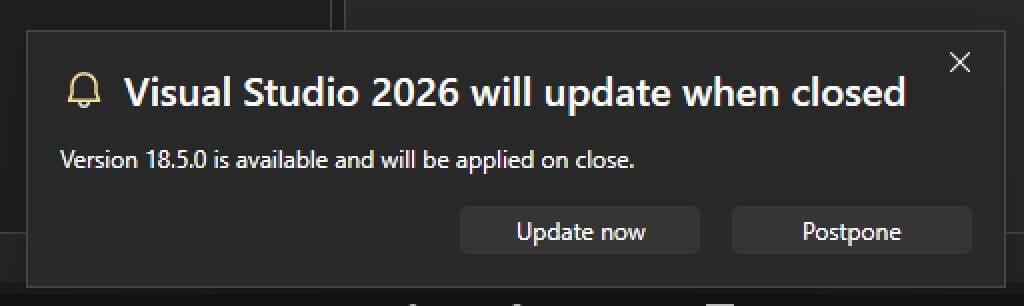
Auto-update in Visual Studio is unpopular with some, but tricky to disable
Another common gripe concerns forced Visual Studio updates, which now seem to afflict this developer tool as well as Windows itself. By default, a dialog appears periodically with the options "Update now" or "postpone," where the default is to update when Visual Studio closes, but a user reports that "after several postpones, Visual Studio finally decided to update by itself."
Microsoft said: "The primary reason for this feature is to help keep your environment secure and ensure you have the latest features, performance improvements, and reliability fixes without delay the next time you open Visual Studio."
Many developers consider that they should decide when to update. "I've had this interrupt meetings, instructional lectures, and important sessions where I am running the console in debug mode," said one.
A workaround has been found, and is given in the issue thread referenced above, involving an edit to a configuration file called state.json, with options not available through the settings user interface. ®
More about
Narrower topics
- Active Directory
- Azure
- Bing
- BSoD
- Copilot+ PC
- Excel
- Exchange Server
- HoloLens
- Internet Explorer
- Microsoft 365
- Microsoft Build
- Microsoft Edge
- Microsoft Fabric
- Microsoft Ignite
- Microsoft Office
- Microsoft Surface
- Microsoft Teams
- .NET
- Office 365
- OS/2
- Outlook
- Patch Tuesday
- Pluton
- SharePoint
- Skype
- SQL Server
- Visual Studio Code
- Windows
- Windows 10
- Windows 11
- Windows 7
- Windows 8
- Windows Server
- Windows Server 2003
- Windows Server 2008
- Windows Server 2012
- Windows Server 2013
- Windows Server 2016
- Windows Subsystem for Linux
- Windows XP
- Xbox
- Xbox 360
Broader topics
More about
More about
Narrower topics
- Active Directory
- Azure
- Bing
- BSoD
- Copilot+ PC
- Excel
- Exchange Server
- HoloLens
- Internet Explorer
- Microsoft 365
- Microsoft Build
- Microsoft Edge
- Microsoft Fabric
- Microsoft Ignite
- Microsoft Office
- Microsoft Surface
- Microsoft Teams
- .NET
- Office 365
- OS/2
- Outlook
- Patch Tuesday
- Pluton
- SharePoint
- Skype
- SQL Server
- Visual Studio Code
- Windows
- Windows 10
- Windows 11
- Windows 7
- Windows 8
- Windows Server
- Windows Server 2003
- Windows Server 2008
- Windows Server 2012
- Windows Server 2013
- Windows Server 2016
- Windows Subsystem for Linux
- Windows XP
- Xbox
- Xbox 360


