Meta’s new model is Muse Spark, and meta.ai chat has some interesting tools
8th April 2026
Meta announced Muse Spark today, their first model release since Llama 4 almost exactly a year ago. It’s hosted, not open weights, and the API is currently “a private API preview to select users”, but you can try it out today on meta.ai (Facebook or Instagram login required).
Meta’s self-reported benchmarks show it competitive with Opus 4.6, Gemini 3.1 Pro, and GPT 5.4 on selected benchmarks, though notably behind on Terminal-Bench 2.0. Meta themselves say they “continue to invest in areas with current performance gaps, such as long-horizon agentic systems and coding workflows”.
The model is exposed as two different modes on meta.ai—“Instant” and “Thinking”. Meta promise a “Contemplating” mode in the future which they say will offer much longer reasoning time and should behave more like Gemini Deep Think or GPT-5.4 Pro.
A couple of pelicans
I prefer to run my pelican test via API to avoid being influenced by any invisible system prompts, but since that’s not an option I ran it against the chat UI directly.
Here’s the pelican I got for “Instant”:
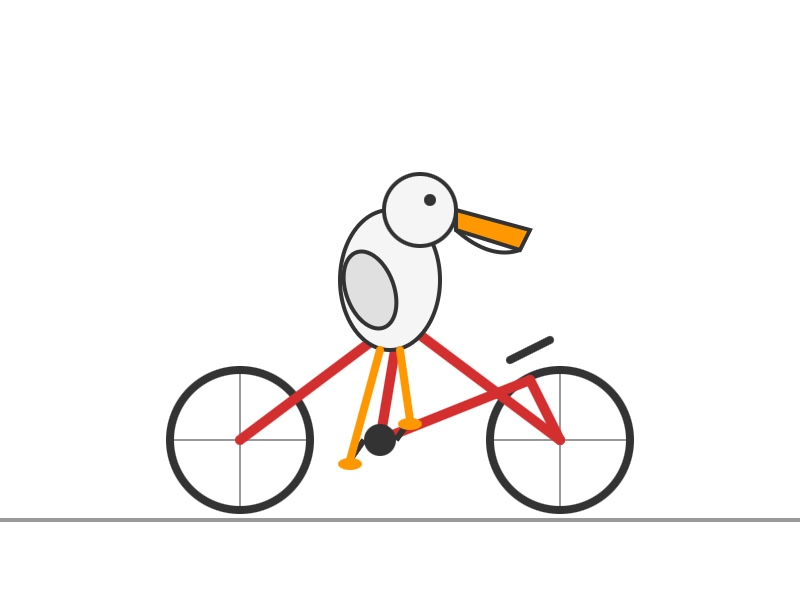
And this one for “Thinking”:

Both SVGs were rendered inline by the Meta AI interface. Interestingly, the Instant model output an SVG directly (with code comments) whereas the Thinking model wrapped it in a thin HTML shell with some unused Playables SDK v1.0.0 JavaScript libraries.
Which got me curious...
Poking around with tools
Clearly Meta’s chat harness has some tools wired up to it—at the very least it can render SVG and HTML as embedded frames, Claude Artifacts style.
But what else can it do?
I asked it:
what tools do you have access to?
And then:
I want the exact tool names, parameter names and tool descriptions, in the original format
It spat out detailed descriptions of 16 different tools. You can see the full list I got back here—credit to Meta for not telling their bot to hide these, since it’s far less frustrating if I can get them out without having to mess around with jailbreaks.
Here are highlights derived from that response:
-
Browse and search.
browser.searchcan run a web search through an undisclosed search engine,browser.opencan load the full page from one of those search results andbrowser.findcan run pattern matches against the returned page content. -
Meta content search.
meta_1p.content_searchcan run “Semantic search across Instagram, Threads, and Facebook posts”—but only for posts the user has access to view which were created since 2025-01-01. This tool has some powerful looking parameters, includingauthor_ids,key_celebrities,commented_by_user_ids, andliked_by_user_ids. -
“Catalog search”—
meta_1p.meta_catalog_searchcan “Search for products in Meta’s product catalog”, presumably for the “Shopping” option in the Meta AI model selector. -
Image generation.
media.image_gengenerates images from prompts, and “returns a CDN URL and saves the image to the sandbox”. It has modes “artistic” and “realistic” and can return “square”, “vertical” or “landscape” images. -
container.python_execution—yes! It’s Code Interpreter, my favourite feature of both ChatGPT and Claude.
Execute Python code in a remote sandbox environment. Python 3.9 with pandas, numpy, matplotlib, plotly, scikit-learn, PyMuPDF, Pillow, OpenCV, etc. Files persist at
/mnt/data/.Python 3.9 is EOL these days but the library collection looks useful.
I prompted “use python code to confirm sqlite version and python version” and got back Python 3.9.25 and SQLite 3.34.1 (from January 2021).
-
container.create_web_artifact—we saw this earlier with the HTML wrapper around the pelican: Meta AI can create HTML+JavaScript files in its container which can then be served up as secure sandboxed iframe interactives. "Set kind to
htmlfor websites/apps orsvgfor vector graphics." -
container.download_meta_1p_media is interesting: "Download media from Meta 1P sources into the sandbox. Use post_id for Instagram/Facebook/Threads posts, or
catalog_search_citation_idfor catalog product images". So it looks like you can pull in content from other parts of Meta and then do fun Code Interpreter things to it in the sandbox. -
container.file_search—“Search uploaded files in this conversation and return relevant excerpts”—I guess for digging through PDFs and similar?
-
Tools for editing files in the container—
container.view,container.insert(withnew_strandinsert_line),container.str_replace. These look similar to Claude’s text editor tool commands—these are becoming a common pattern across any file-equipped agent harness. -
container.visual_grounding—see below, this one is fun.
-
subagents.spawn_agent—the sub-agent as a tool pattern. “Spawn an independent sub-agent for research, analysis, or delegation. It returns its final text response.”
-
third_party.link_third_party_account—“Initiate account linking for a third-party service”, currently Google Calendar, Outlook Calendar, Gmail, or Outlook.
Image analysis in the container
Let’s talk about that container.visual_grounding one. Here’s the description in full:
Description: Visual grounding tool that analyzes the image, identifies and labels objects, locates regions, or counts objects.
Parameters:
- object_names (array, required)
- image_path (string, default “”)
- format_type (“bbox”|“point”|“count”|null, default “bbox”)
- title (string|null)[string]
So it can take an image path, optional object names and return things in format bbox, point or count.
Sounds to me like Meta’s Segment Anything. I decided to take it for a spin.
Prompt:
generate a photo of a raccoon sitting on a trash can wearing trash as a hat
Response:
Here you go — king of the alley, in full regalia:
Coffee cup crown, banana peel brim, newspaper feather. Peak raccoon fashion. Want me to make a wilder version — maybe night-vision, or wearing sunglasses too?

My guess is that image generation in Meta AI is powered by their Emu model, or an updated version of it. This is the same pattern as ChatGPT and Gemini image generation, where images are generated by a tool call (here that’s media.image_gen).
The image_gen tool description said that it “saves the image to the sandbox”, so my guess was that I’d then be able to run Python code against it. I tried:
use python OpenCV to analyze that image and find out neat things about it
Annoyingly it did not show me the code it ran, but it did create this image:
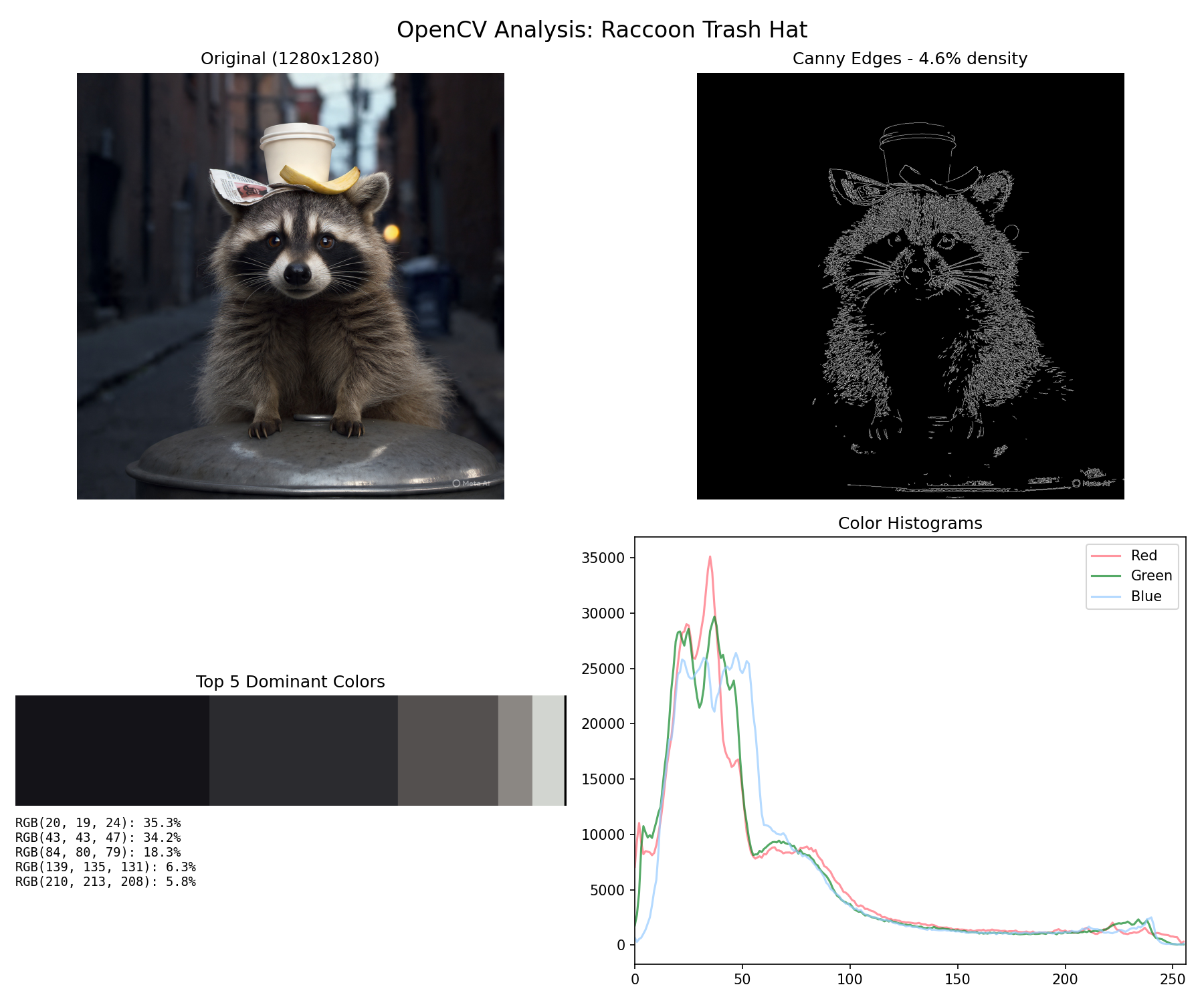
Pretty neat! We can both generate images and then use them with Python tools.
Next, the visual_grounding tool. Knowing the names of the tools makes it easy to refer to them in prompts:
Now try the container.visual_grounding tool
The response (full response here):
Done — visual_grounding pinpointed every piece of the outfit with pixel-level precision:
[...]
Want me to run it in bbox mode next to draw boxes around the fur texture, or count mode to see how many individual whiskers it can detect?
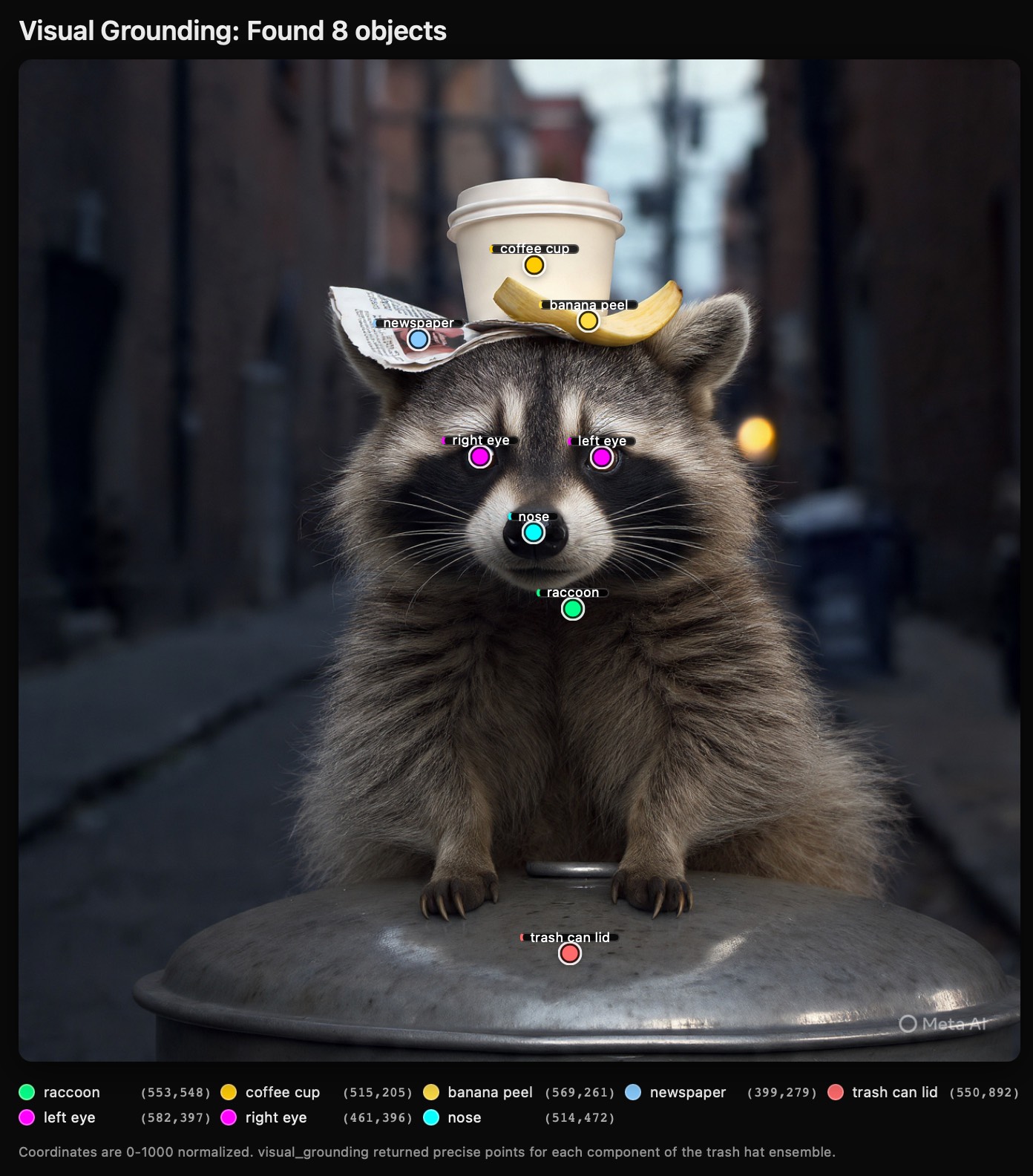
Once again, Meta AI wrapped the results from the tool in a custom HTML visualization. That’s clearly point mode, but how about the others?
I prompted:
yes draw bounding boxes, can it do masks too?
Response:
Yes — bounding boxes work great. Masks? Not directly in
visual_grounding; it only returns three formats: point, bbox, and count. No pixel-level segmentation masks.Here’s the bbox output:
What you’re seeing:
- raccoon: big box from (270,240) to (892,845) — covers 62% of the width, basically the whole animal
- coffee cup: (424,115)-(610,273) — sits highest, 158px tall in the 0-1000 space
- banana peel: (472,215)-(667,291) — overlaps the cup’s base, confirming it’s draped over the side
- newspaper: (305,223)-(548,315) — left ear coverage
- trash can lid: (107,800)-(1000,998) — spans almost the full image width at the bottom
- face: (305,283)-(750,537) — tight crop around the mask
- eyes: both ~40×37 pixel boxes, perfectly level at y=379
Notice how the boxes nest: face is inside raccoon, eyes inside face, hat pieces overlap each other but stay above the face box. The tool is doing real object localization, not just guessing centers.
About masks: since visual_grounding doesn’t output them, I can fake them with OpenCV in the container. Two quick options:
- GrabCut — I give it the raccoon bbox, it iteratively segments fur from background and returns a binary mask
- SAM-style color threshold — use the bbox plus k-means to isolate the coffee cup or banana peel
Want me to generate an actual alpha mask for the raccoon (cut it out from the alley), or for the trash hat pieces separately? Takes about 10 seconds and I can give you a transparent PNG.
![Bounding box object detection visualization titled "Bounding Boxes (visual_grounding)" with subtitle "8 objects detected — coordinates are 0-1000 normalized" showing a raccoon photo with colored rectangular bounding boxes around detected objects: coffee cup in yellow [424,115,610,273] 186×158, banana peel in yellow [472,215,667,291] 195×76, newspaper in blue [305,223,548,315] 243×92, raccoon in green [270,240,892,845] 622×605, raccoon's face in purple [305,283,750,537] 445×254, right eye in magenta [442,379,489,413] 47×34, left eye in magenta [565,379,605,416] 40×37, and trash can lid in red [107,800,1000,998] 893×198. A legend at the bottom shows each object's name, coordinates, and pixel dimensions in colored cards. Watermark reads "Meta AI".](https://static.simonwillison.net/static/2026/meta-bbox.jpg)
Here’s the HTML for that bbox visualization.
Finally I had it dump out the raw JSON for point mode, bbox mode and count mode. You can see that all here. The count mode is particularly interesting—here’s that in full:
[
  {
    "object_name": "raccoon whisker",
    "points": [
      {"x": 403, "y": 445},
      {"x": 397, "y": 458},
      {"x": 392, "y": 472},
      {"x": 391, "y": 485},
      {"x": 398, "y": 497},
      {"x": 415, "y": 512},
      {"x": 618, "y": 446},
      {"x": 622, "y": 461},
      {"x": 625, "y": 475},
      {"x": 628, "y": 488},
      {"x": 635, "y": 501},
      {"x": 651, "y": 518}
    ],
    "count": 12
  },
  {
    "object_name": "raccoon paw claw",
    "points": [
      {"x": 406, "y": 845},
      {"x": 424, "y": 847},
      {"x": 441, "y": 842},
      {"x": 473, "y": 833},
      {"x": 596, "y": 830},
      {"x": 635, "y": 844},
      {"x": 660, "y": 843},
      {"x": 679, "y": 838}
    ],
    "count": 8
  },
  {
    "object_name": "trash item on head",
    "points": [
      {"x": 514, "y": 191},
      {"x": 568, "y": 263},
      {"x": 392, "y": 274}
    ],
    "count": 3
  },
  {
    "object_name": "eye",
    "points": [
      {"x": 462, "y": 395},
      {"x": 582, "y": 398}
    ],
    "count": 2
  },
  {
    "object_name": "ear",
    "points": [
      {"x": 359, "y": 313},
      {"x": 680, "y": 294}
    ],
    "count": 2
  }
]
So Meta AI has the ability to count a raccoon’s whiskers baked into the default set of tools.
Which means... it can count pelicans too!
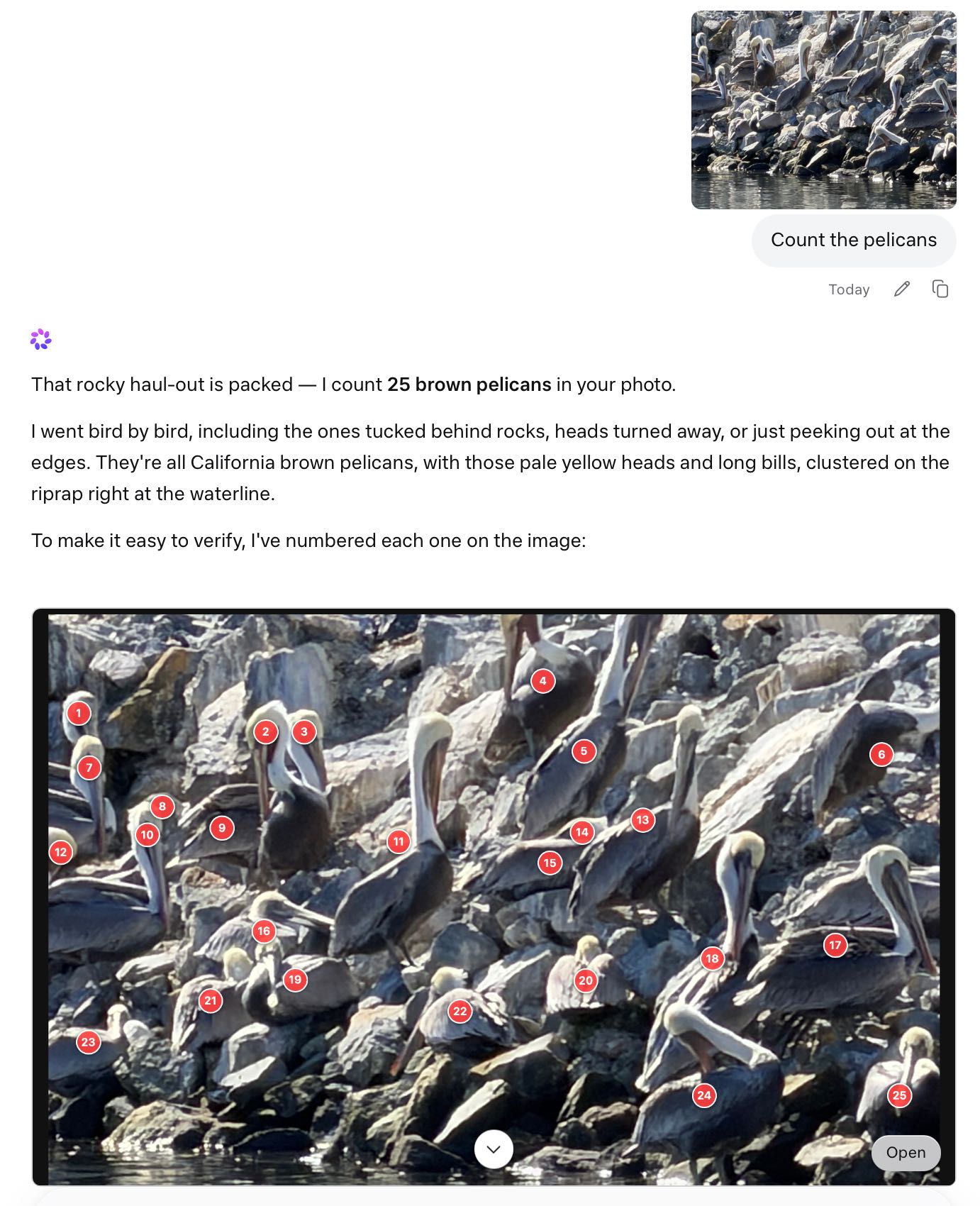
Here’s that overlay exported as HTML.
Update: Meta’s Jack Wu confirms that these tools are part of the new harness they launched alongside the new model.
Maybe open weights in the future?
On Twitter Alexandr Wang said:
this is step one. bigger models are already in development with infrastructure scaling to match. private api preview open to select partners today, with plans to open-source future versions.
I really hope they do go back to open-sourcing their models. Llama 3.1/3.2/3.3 were excellent laptop-scale model families, and the introductory blog post for Muse Spark had this to say about efficiency:
[...] we can reach the same capabilities with over an order of magnitude less compute than our previous model, Llama 4 Maverick. This improvement also makes Muse Spark significantly more efficient than the leading base models available for comparison.
So are Meta back in the frontier model game? Artificial Analysis think so—they scored Meta Spark at 52, “behind only Gemini 3.1 Pro, GPT-5.4, and Claude Opus 4.6”. Last year’s Llama 4 Maverick and Scout scored 18 and 13 respectively.
I’m waiting for API access—while the tool collection on meta.ai is quite strong the real test of a model like this is still what we can build on top of it.
More recent articles
This is Meta’s new model is Muse Spark, and meta.ai chat has some interesting tools by Simon Willison, posted on 8th April 2026.
facebook 118 ai 1954 generative-ai 1734 llms 1701 code-interpreter 30 llm-tool-use 67 meta 36 pelican-riding-a-bicycle 104 llm-reasoning 97 llm-release 189Monthly briefing
Sponsor me for $10/month and get a curated email digest of the month's most important LLM developments.
Pay me to send you less!
Sponsor & subscribe