
Deploy SageMaker AI inference endpoints with set GPU capacity using training plans
Amazon AWS AI Blog / 3/25/2026
💬 OpinionDeveloper Stack & InfrastructureTools & Practical Usage
Key Points
- The article explains how to find available p-family GPU capacity and reserve it using SageMaker AI training plans for subsequent inference use.
- It walks through creating a training plan reservation tailored for inference workloads and then deploying a SageMaker AI inference endpoint that runs on the reserved GPU capacity.
- A data scientist’s end-to-end journey is used to show how to manage the endpoint across the reservation lifecycle, from reservation setup to operational handling.
- The post provides a practical workflow for aligning model evaluation and inference deployment with predictable, pre-allocated GPU resources.
In this post, we walk through how to search for available p-family GPU capacity, create a training plan reservation for inference, and deploy a SageMaker AI inference endpoint on that reserved capacity. We follow a data scientist's journey as they reserve capacity for model evaluation and manage the endpoint throughout the reservation lifecycle.
広告
💡 Insights using this article
This article is featured in our daily AI news digest — key takeaways and action items at a glance.
Related Articles
![[Boost]](/_next/image?url=https%3A%2F%2Fmedia2.dev.to%2Fdynamic%2Fimage%2Fwidth%3D800%252Cheight%3D%252Cfit%3Dscale-down%252Cgravity%3Dauto%252Cformat%3Dauto%2Fhttps%253A%252F%252Fdev-to-uploads.s3.amazonaws.com%252Fuploads%252Fuser%252Fprofile_image%252F3618325%252F470cf6d0-e54c-4ddf-8d83-e3db9f829f2b.jpg&w=3840&q=75)
[Boost]
Dev.to

Managing LLM context in a real application
Dev.to

Got My 39-Agent System Audited Live. Here's What the Maturity Scorecard Revealed.
Dev.to

OpenAI Killed Sora — Here's Your 10-Minute Migration Guide (Free API)
Dev.to
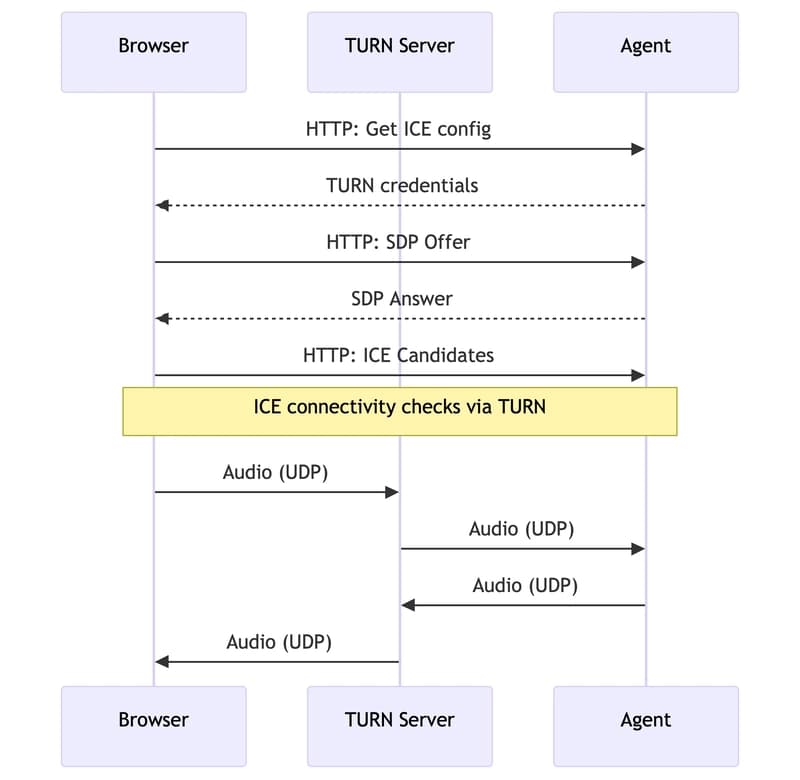
Switching my AI voice agent from WebSocket to WebRTC — what broke and what I learned
Dev.to


