16th April 2026
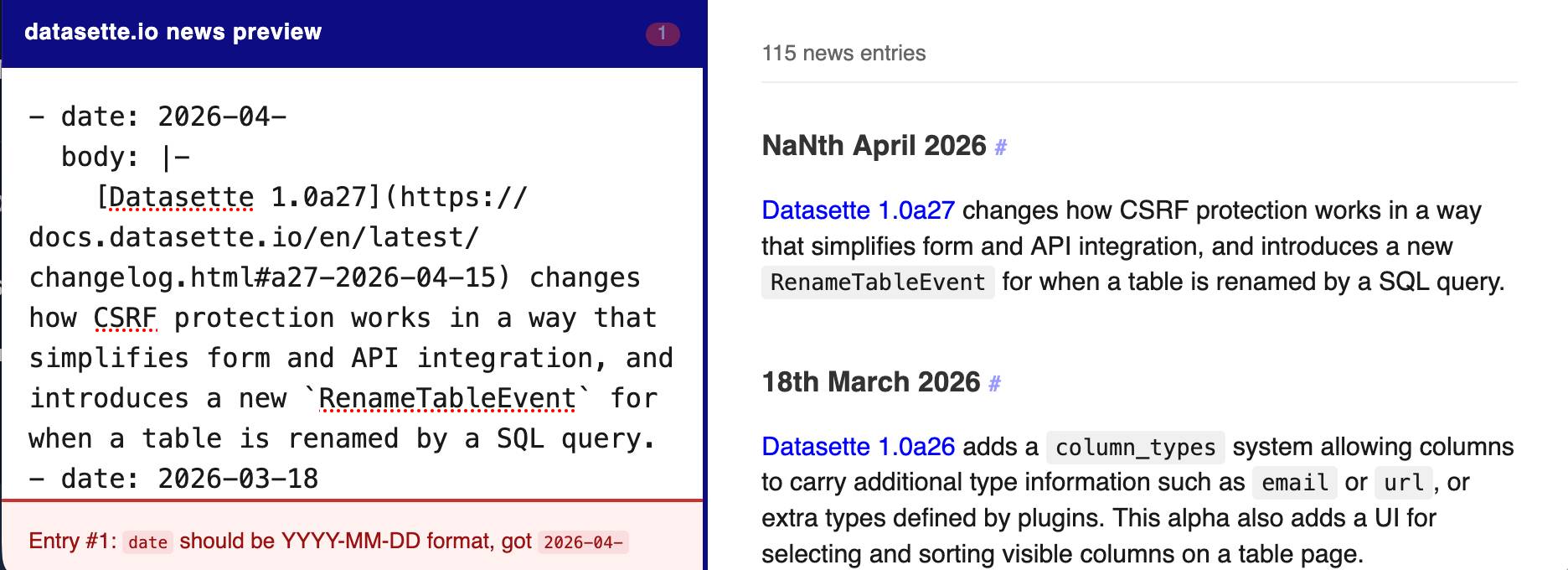
The datasette.io website has a news section built from this news.yaml file in the underlying GitHub repository. The YAML format looks like this:
- date: 2026-04-15
  body: |-
    [Datasette 1.0a27](https://docs.datasette.io/en/latest/changelog.html#a27-2026-04-15) changes how CSRF protection works in a way that simplifies form and API integration, and introduces a new `RenameTableEvent` for when a table is renamed by a SQL query.
- date: 2026-03-18
  body: |-
    ...
This format is a little hard to edit, so I finally had Claude build a custom preview UI to make checking for errors have slightly less friction.
I built it using standard claude.ai and Claude Artifacts, taking advantage of Claude's ability to clone GitHub repos and look at their content as part of a regular chat:
Clone https://github.com/simonw/datasette.io and look at the news.yaml file and how it is rendered on the homepage. Build an artifact I can paste that YAML into which previews what it will look like, and highlights any markdown errors or YAML errors
Recent articles
- Meta's new model is Muse Spark, and meta.ai chat has some interesting tools - 8th April 2026
- Anthropic's Project Glasswing - restricting Claude Mythos to security researchers - sounds necessary to me - 7th April 2026
- The Axios supply chain attack used individually targeted social engineering - 3rd April 2026
This is a beat by Simon Willison, posted on 16th April 2026.
tools 58 datasette 1476 claude 265 vibe-coding 85Monthly briefing
Sponsor me for $10/month and get a curated email digest of the month's most important LLM developments.
Pay me to send you less!
Sponsor & subscribe