I like Claude Code a lot.
Not because it always picks the perfect model, and not because every answer is magical, but because the workflow is good. It feels fast, focused, and genuinely useful for day-to-day coding. The catch, of course, is that Claude Code normally assumes you’re plugged into Anthropic’s own API.
But there’s a clever workaround.
If all you want is the Claude Code interface—the CLI, the editor integration, the overall UX—you can keep that frontend and swap out the backend model. One of the more interesting ways to do that right now is with NVIDIA Build, which offers a catalog of hosted models and free serverless endpoints for development.
The glue between those two worlds is an open-source project called free-claude-code.
This post walks through what the setup actually is, why it’s interesting, and how to get it running.
What this actually means
Let’s clear up the most important point first:
This does not give you Anthropic’s Claude models for free.
What it does give you is a way to use Claude Code as the client while routing requests to a different model provider behind the scenes.
In this case, that provider is NVIDIA Build / NVIDIA NIM.
So the setup looks like this:
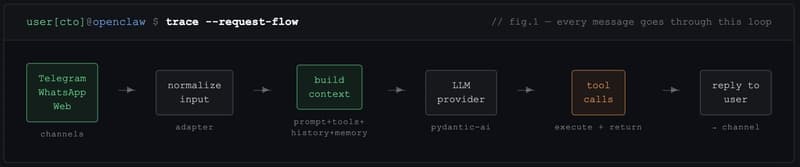
Claude Code -> local compatibility proxy -> NVIDIA-hosted model
That distinction matters. If you publish this as “free Claude,” people will feel misled. If you publish it as “use Claude Code with NVIDIA’s free models,” that’s accurate—and honestly, still pretty compelling.
Why this is interesting
There are really two separate things people often bundle together:
- The model itself
- The interface used to work with the model
Claude Code is both a model ecosystem and a very polished coding interface. The neat trick here is that you can separate those concerns.
If you enjoy the Claude Code UX, but you want to experiment with lower-cost or free hosted models, this setup gives you that option.
And NVIDIA Build is a strong fit for that kind of experimentation because it already exposes a large public model catalog, including a set of free serverless endpoints.
The two pieces you need
1. An NVIDIA Build account and API key
Start here:
Create an account, go through NVIDIA’s developer sign-in flow, and generate an API key.
That key is what the proxy will use to talk to NVIDIA’s hosted model endpoints.
2. The free-claude-code proxy
The project lives here:
What it does is simple in principle:
- it exposes an Anthropic-compatible API surface locally
- Claude Code points at that local server
- the proxy translates and forwards those requests to another provider
The project supports several providers, but for this post the NVIDIA path is the one that matters.
How the NVIDIA route works
Inside the project, NVIDIA is treated as a first-class provider.
The relevant bits are straightforward:
- the provider name is
nvidia_nim - the API key variable is
NVIDIA_NIM_API_KEY - requests go to:
https://integrate.api.nvidia.com/v1
The sample configuration in the repo currently defaults to this model:
MODEL="nvidia_nim/z-ai/glm4.7"
That’s an important detail because it shows the project is not just generically “NVIDIA-compatible” in theory—it ships with a concrete NVIDIA-backed model configuration out of the box.
Installing the proxy
There are two ways to install it.
Option 1: Clone the repo
git clone https://github.com/Alishahryar1/free-claude-code.git
cd free-claude-code
cp .env.example .env
Option 2: Install it as a tool
uv tool install git+https://github.com/Alishahryar1/free-claude-code.git
fcc-init
That fcc-init command creates a config file at:
~/.config/free-claude-code/.env
One thing to note: the current project configuration requires Python 3.14+.
Configuring it for NVIDIA Build
Open the generated .env file and set at least these values:
NVIDIA_NIM_API_KEY=your_nvidia_key_here
MODEL="nvidia_nim/z-ai/glm4.7"
VOICE_NOTE_ENABLED=false
A few details are worth knowing:
- the model value must include the provider prefix
- for NVIDIA, that prefix is
nvidia_nim/... - the repo can also map different backends to Opus, Sonnet, and Haiku-style requests, but you can ignore that at first and just set
MODEL
That’s enough for a simple initial setup.
Starting the local proxy
If you cloned the repo, run:
uv run uvicorn server:app --host 0.0.0.0 --port 8082
If you installed it as a tool, you can usually just run:
free-claude-code
At that point you have a local server that looks enough like Anthropic’s API for Claude Code to use it.
Pointing Claude Code at the proxy
This is the key handoff.
Launch Claude Code like this:
ANTHROPIC_AUTH_TOKEN="freecc" ANTHROPIC_BASE_URL="http://localhost:8082" claude
The subtle but important detail is the base URL.
It should point to the proxy root:
http://localhost:8082
—not to /v1.
That small detail is easy to get wrong, and if you do, the whole setup feels broken for no obvious reason.
What you get out of it
If everything is set up correctly, the result is pretty nice:
- you keep the Claude Code workflow
- you use NVIDIA-hosted models underneath
- you don’t need an Anthropic API key for the model calls themselves
- you can experiment without immediately committing to another paid API bill
That makes this a good fit for people who:
- like Claude Code’s UX
- want to try coding with alternative models
- already have an NVIDIA Build account
- want a lower-cost or free development setup
What to expect in practice
This is where expectations matter.
Using Claude Code with a non-Claude model is a bit like putting a different engine in a familiar car. The dashboard still looks the same, the steering wheel is where you expect it to be, but the feel changes.
Some models will be surprisingly good.
Some will be worse at tool use.
Some will feel faster.
Some will be noticeably less consistent.
That’s not a flaw in the proxy—it’s just the reality of using a frontend designed around one ecosystem with models from another.
So the right expectation is not:
“I now have free Claude.”
The right expectation is:
“I now have Claude Code’s interface connected to a different model provider.”
That’s still useful. It’s just a different claim.
Why I think this matters
We’re heading toward a world where the interface layer and the model layer are increasingly interchangeable.
That’s good news.
It means tools people genuinely enjoy using don’t have to stay locked to a single backend forever. If you like a workflow, you should be able to keep it and swap the model depending on cost, speed, quality, or availability.
That’s exactly why projects like free-claude-code are interesting.
They make the model layer more replaceable.
And NVIDIA Build makes that especially practical because it lowers the barrier to trying a bunch of hosted models without having to build your own inference setup first.
Final thoughts
I wouldn’t pitch this as a magic loophole.
I’d pitch it as something more honest—and more useful:
a practical way to use Claude Code as a frontend for NVIDIA Build’s free hosted models.
If you already enjoy Claude Code, that’s worth trying.
And even if you end up going back to Anthropic’s native stack later, this setup is a nice reminder that the future probably belongs to tools that treat model providers as swappable infrastructure rather than fixed destiny.